
First and fore most you must pay attention to which application the error is coming from, i.e (Chrome or Edge) In this case it’s Microsoft Edge.

Open Microsoft Edge to open web browser. Click on your “three dots”.

Scroll down to “Settings”
On the “Settings Page” click on “cookies and site permissions” > “All Sites
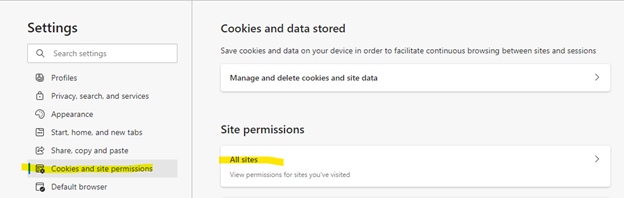
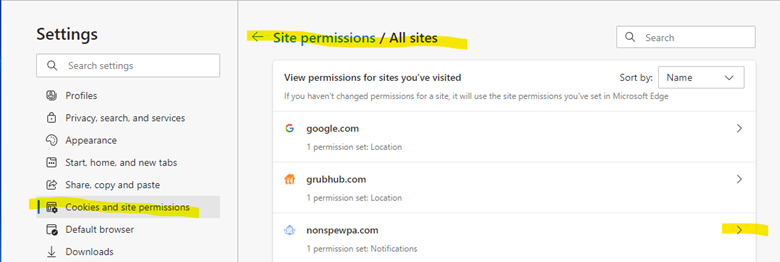
Under the “site permissions tab” select the website “nonspewpa…”, i.e. (which ever website is listed).
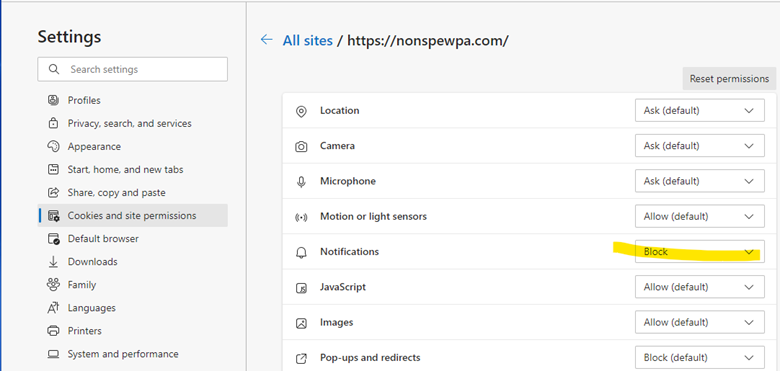
Next select the arrow and choose “block” (this should stop the reoccurring notice).
Lastly, perform a restart of your computer.
Comments
0 comments
Please sign in to leave a comment.